Reports
Each report answers one question a principal actually asks, prints on your letterhead, and exports to CSV for your bookkeeper or auditor.
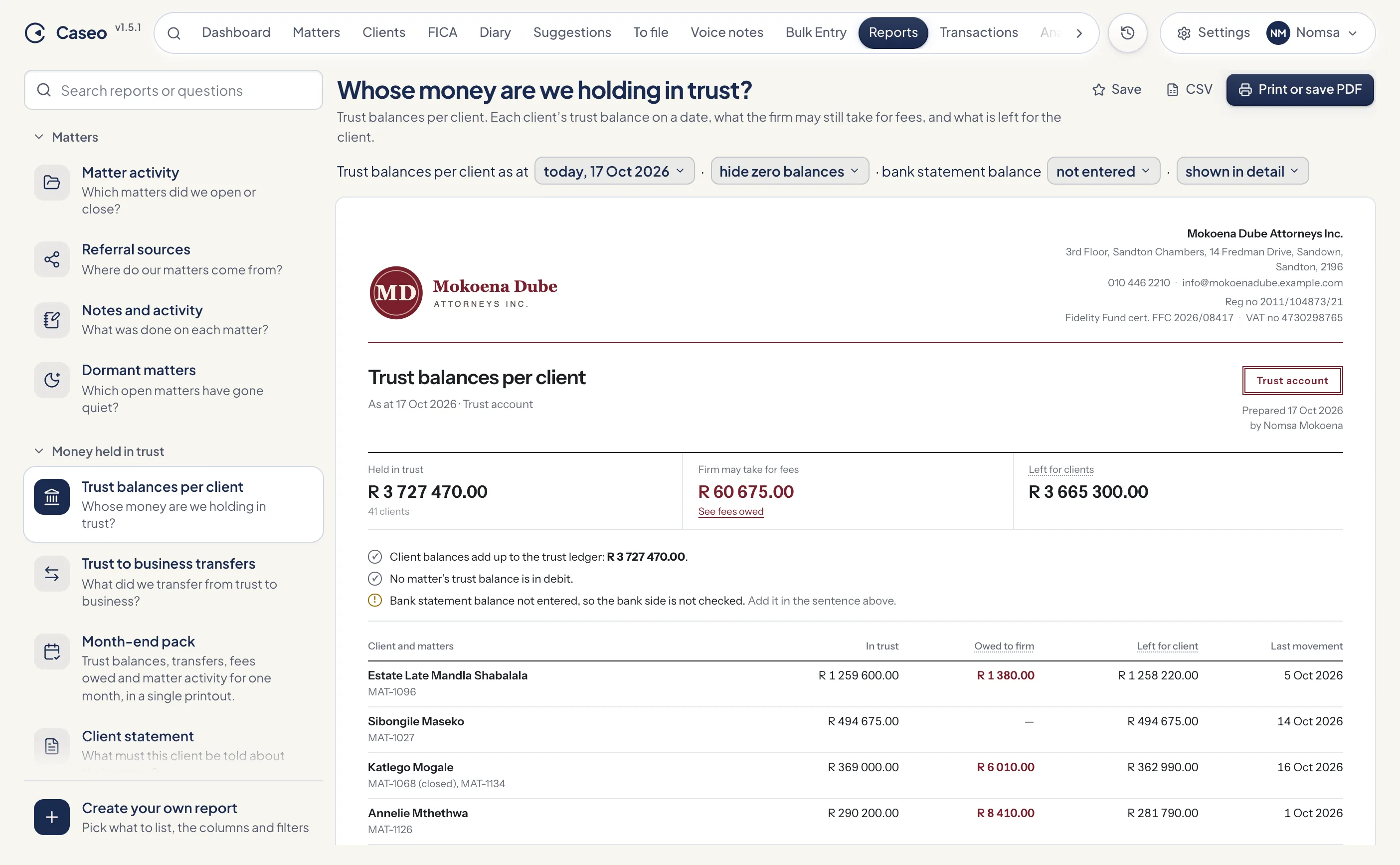
How a report works
- Pick a report from the sidebar, or type a question into Search reports or questions. Search understands everyday words: "debtors", "Legal Aid", "audit" and "54.14" all find the right report.
- The report's settings read as a sentence at the top, for example "Trust balances per client as at today · hide zero balances". Click any orange word to change it.
- Below is an A4 preview on your firm's letterhead. Trust reports are stamped "Trust account", and every report ends with who prepared it and when.
- Click a matter reference anywhere in a report to open that matter beside it.
Periods
Reports with a period offer This month, Last month, Last 3 months, This year, This financial year, Last financial year, Last year and All time, or a custom from-and-to range that can keep rolling up to today. The financial year runs from 1 March. Balance reports ask for an "as at" date: today, the end of any of the last three months, or the end of last financial year.
Printing, PDF and CSV
- Print or save PDF opens the report as numbered A4 pages. Choose "Save as PDF" in the print dialog to keep a copy. If nothing opens, allow pop-ups for Caseo.
- CSV downloads the rows for Excel or your accounting package, with amounts as plain numbers.
- Both buttons wait until every row has loaded, so an export is never half a report.
Saving a report
Click Save (the star) to keep a report with its current settings under Saved in the sidebar. Saved reports are yours: other members don't see them. Because periods like "last month" are relative, a saved report rolls forward by itself, so "Month-end pack, last month" is always last month. Rename or remove saved reports at any time; removing one never touches your data.
Matters
| Matter activity | Which matters did we open or close? Matters opened, closed, or either, in a period, with the list behind every number. Filter by fee earner, type and status, group by fee earner, type, referral source or month, and include notes if you want them. |
| Referral sources | Where do our matters come from? Matters opened per referral source in a period. |
| Notes and activity | What was done on each matter? Every note captured in a period, grouped by matter, filterable by fee earner. |
| Dormant matters | Which open matters have gone quiet? Open matters with no note, diary entry, document or money movement in 30, 60 or 90 days or 6 months, with the next diary date if there is one. Files captured through Bulk Entry are left out. |
Money held in trust
| Trust balances per client | Whose money are we holding in trust? Each client's trust balance as at a date, what the firm may still take for fees, and what is left for the client. It checks that client balances add up to the trust ledger and that no matter is in debit. Enter your bank statement balance and it tells you whether the bank agrees with the ledger, or by how much it differs. |
| Trust to business transfers | Every fee transfer from trust to business in a period, per matter, with the total. |
| Month-end pack | One month's trust balances, transfers, fees owed, matter activity and overdue diary in a single printout. Choose the sections and the month (this month or any of the last 12). |
| Client statement | What must this client be told about their money? One client across all their matters over a period: trust received and paid out, fees and disbursements raised, what was paid, and what is owed either way. This is a working copy; to issue a numbered statement (and keep the copy), print it from the matter's account. See Statements of account. |
| Statements issued | Every statement of account issued in a period, with its number and totals. Filter to trust, business, or both. |
Fees and debtors
| Outstanding fees and disbursements | Who owes us, and what can we take from trust today? Per matter: what is owed, how much of it trust covers, what the client must still pay, and how old the debt is (0–30, 31–60, 61–90 and 90+ days). Narrow it to what you can take from trust, or what clients must pay, and filter by fee earner. |
| Third-party payer collections | Money received from each third-party payer (for example Legal Aid) in a period, per matter. |
| Unpaid invoices | Issued invoices with something still owing after payments, credit notes and fees paid from trust, with how long each has been outstanding. Show all unpaid, only overdue, or not yet paid with drafts listed separately. |
| Business income and expenses | Fee income (excluding VAT and disbursements), money that reached the business account, expenses by category and salaries. Trust money is never counted as income. |
Diary and team
| Diary and deadlines | Overdue and upcoming diary entries per fee earner: overdue, next 7 days, next 30 days, or overdue plus the next 30 days. |
| Fee earner workload | Open matters, new and closed matters, notes and overdue diary entries for each fee earner. |
Create your own report
Create your own report, at the bottom of the sidebar, builds a list in five steps with a live preview beside it:
- What to list: matters, money movements, or diary entries.
- Columns: for matters, anything from reference, client and description to fee earner, referral source, opened and closed dates, your reference, client ID number and phone. For money: date, account, type, matter, client, description, paid by, third-party payer, captured by and amount. For diary entries: date, matter, client, entry, fee earner and matter type.
- Which ones: the period, which date it applies to, and filters.
- Grouping: group and sort the rows.
- Name it: save it. You can come back and edit a custom report later.
Money lists keep trust in and trust out as separate totals, so a custom report never mixes trust and business into one misleading figure.
Something unclear or out of date? Email hello@caseo.co.za.