Bank reconciliation
Import your bank statement, let Caseo match it against the ledger, clear what's left, and see a three-way check of bank, ledger and client balances.
Setting up an account
Open Reconciliation and switch between Trust and Business at the top. The first time, an Administrator sets up the account:
| Bank | FNB, Standard Bank, ABSA, Nedbank, Capitec, Investec, TymeBank, Discovery Bank or Other. |
| Account number | Caseo keeps only the last four digits (and a scrambled fingerprint to recognise the account), never the full number. |
| Go-live month | The first month you reconcile in Caseo. |
| Opening balance | The bank balance at the start of that month. Type it, or take it from your first statement. |
The account you reconcile is cross-checked against the bank details printed on your invoices and statements (Settings → Banking), so a mismatch is caught.
Importing a statement
- Download the month's statement from your online banking as OFX/QFX or CSV.
- Click Upload and choose the file.
- Caseo reads it and lists every line. Built-in layouts cover FNB, Standard Bank, Nedbank, Capitec, Capitec Business and ABSA CSV files. For any other CSV, match the columns once and Caseo remembers the mapping for that account.
Caseo checks the file before accepting it: that it isn't a duplicate, that it belongs to this account, that its opening balance follows on from the last statement, and that it doesn't touch a signed-off month. Up to 5,000 lines per file. The original file is kept. A whole import can be voided with a reason.
Matching
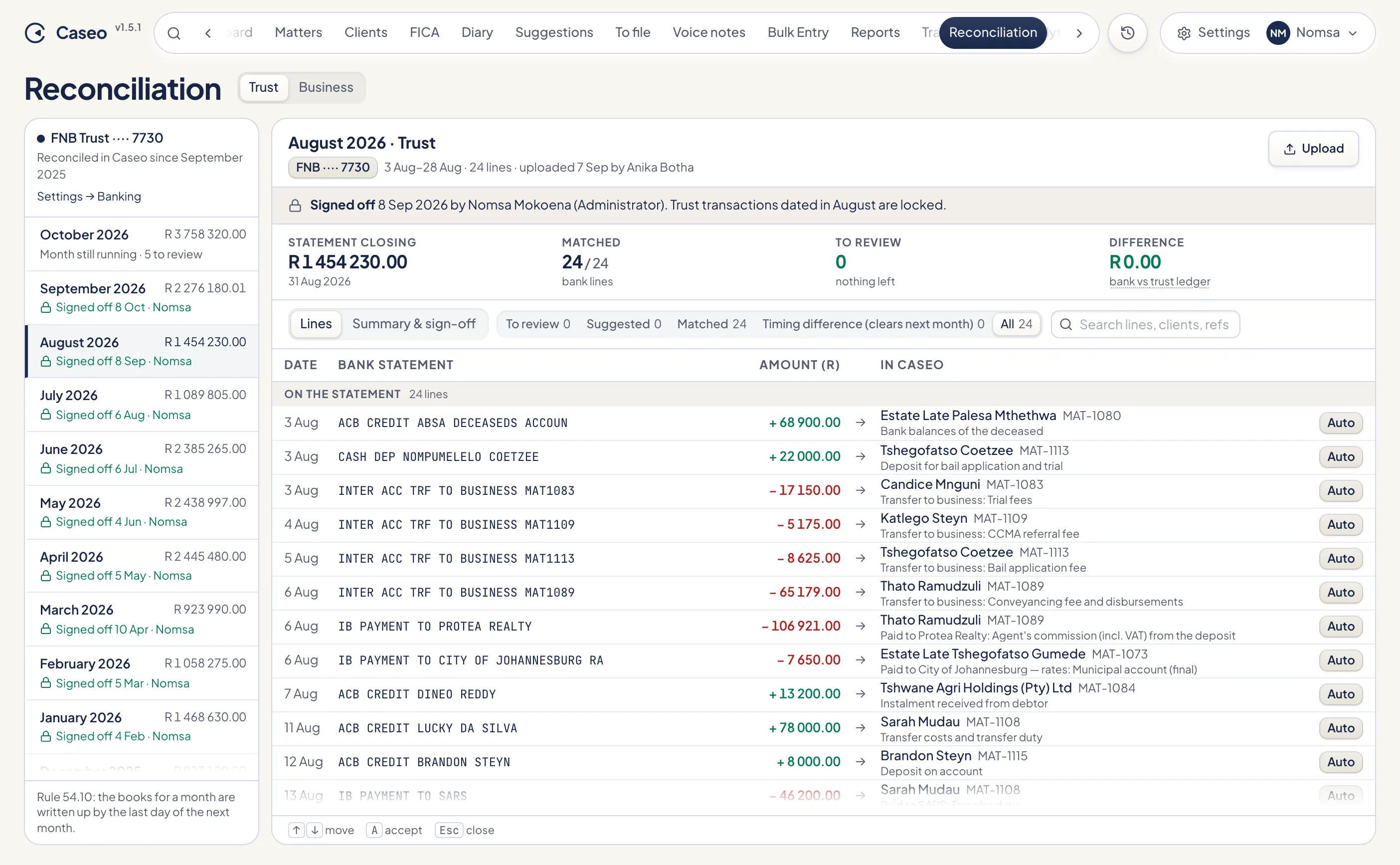
Each bank line is paired with the entry in Caseo it belongs to. Matching is rule-based and predictable: amount, direction (in or out), date and reference.
- Auto: the amount and direction agree, the dates are within three days, and the reference matches or there's only one candidate. Caseo matches these for you.
- Suggested: a likely match over a wider date window, or a group of lines that add up to one entry (or the other way round). Accept or reject it.
- Manual: pick the entry yourself.
Filter the lines with To review, Suggested, Matched, Timing difference and All, or search by line, client or reference. Keys: ↑ ↓ to move, A to accept a suggestion, Esc to close.
Lines with nothing in Caseo
From a bank line with no matching entry you can:
- Create the transaction it represents (a deposit you hadn't captured, for example).
- Record an unallocated deposit, for money you can't yet place on a matter.
- Mark it a firm cost on trust, such as a bank charge that went off the trust account and must be refunded from business.
- Mark it a bank error, with a note.
Entries in Caseo not on the statement
Deposits in transit and payments that haven't cleared yet are carried forward to next month as timing differences, and Caseo expects them on the next statement.
The three-way check
The Summary & sign-off view compares three figures: the bank balance adjusted for timing differences, the trust ledger balance, and the total of client balances plus unallocated money. It then runs these checks, each labelled with the rule it relates to:
| Check | Rule |
|---|---|
| The three balances agree | 54.14.8 |
| No matter is in debit | 54.14.9 |
| Deposits in transit | 54.14.7.2 |
| Firm costs on trust | 54.14.14 |
| Every fee transfer has its twin in business | 54.11 |
| Unallocated money | — |
| Old carried items | — |
| Done by the due date: the end of the following month | 54.10 |
The headline shows the statement closing balance, how many lines are matched, how many are left to review, and the difference between bank and ledger. You are aiming for R 0.00.
The reconciliation pack
Print the reconciliation pack ("Trust bank reconciliation as at…") or export it to CSV for your records and your auditor.
Something unclear or out of date? Email hello@caseo.co.za.