Most firms stay on software they dislike for years because they are afraid of the move. The fear is reasonable. A bad migration can leave trust balances that do not tie up, prescription dates that never made it across, and an auditor asking why the opening position in the new system differs from the closing position in the old one.
It does not have to go that way. Almost every migration problem comes from one of four decisions made badly: what to move, when to cut over, how to prove the balances, and what to do with the old system. This guide takes each in turn and ends with a week-by-week plan.
General information, not legal or accounting advice. Involve your auditor before you set a cut-over date.
Decision 1: what moves, and what stays behind
The instinct is to move everything. Resist it. Moving ten years of transactions line by line is the single biggest cause of slow, expensive, error-prone migrations, and it rarely adds value, because you are legally required to keep the old records anyway.
Sort your data into three groups.
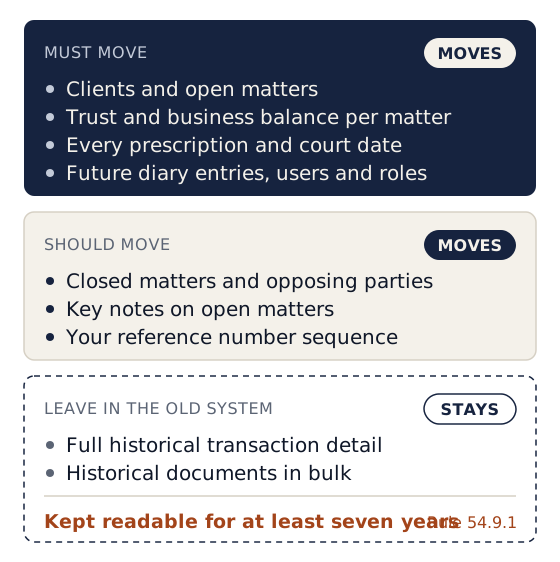
Must move
| Data | Why |
|---|---|
| Clients, with ID or registration numbers, contact details and addresses | Deduplication, FICA and conflict checks depend on them |
| Open matters, with reference numbers, matter type, responsible attorney and status | Day-to-day work |
| Trust balance per matter as at the cut-over date | Rule 54 requires every rand in trust to be attributable to a named person |
| Business balances per matter: fees and disbursements owed, unpaid invoices | So billing and debt collection continue |
| Every prescription date and court date | The highest-risk data in the firm (see our prescription diary guide) |
| Future diary entries | Follow-ups, reviews, investment maturity dates |
| Users and roles | Who can see and do what |
Should move
- Closed matters and opposing parties, at least names and reference numbers. Your conflict checks need them, and clients will phone about old files.
- Key notes on open matters, especially the last instruction and the last action taken.
- Your reference number sequence, so new matters continue from where you are (MAT-1204 is followed by MAT-1205, not MAT-0001).
Leave in the old system (but keep it readable)
- Full historical transaction detail. Bring across opening balances, not every entry since 2014.
- Historical documents in bulk. Attach documents as matters become active, or migrate them in a second phase.
"Leave behind" does not mean "lose". LPC Rule 54.9.1 requires accounting records and client files to be kept for at least seven years from the last entry, and Rule 54.14.4.2 requires electronic records to remain retrievable in readable and printable form, "including by converting the records from legacy to later systems". Before you cancel the old system, you must have a readable copy of its records. See Decision 4.
Electronic records must remain retrievable in readable and printable form, "including by converting the records from legacy to later systems".
LPC Rule 54.14.4.2In practice: history can stay in the old system only while you can still open and print it. That is why the export in Decision 4 comes before you cancel.
Decision 2: the cut-over date
Pick a month-end and make it one you will have reconciled and signed off before you go live.
Why a month-end: your old system's monthly trust reconciliation gives you a reviewed, provable position at that date. The new system starts from the same numbers. Mid-month cut-overs force you to reconstruct a position nobody has reviewed.
Why not your financial year-end, necessarily: it can be neat for the auditor, but it collides with year-end work. Any reconciled month-end works, as long as your auditor knows in advance. Avoid the month before your trust audit report is due and the November-December Fidelity Fund certificate season.
On the cut-over date:
- Stop capturingIn the old system, after the last transaction of the month.
- Reconcile and sign offThat month, in the old system.
- Extract the closing listsExtract the list of trust creditors for that month, the business debtors list and the unpaid invoices list. Rule 54.15
- Open the new system with themThose lists become the opening balances in the new system.
Decision 3: how to prove the balances
This is where auditors focus, so do it formally.
The opening balance proof
Before the new system is used for a single real transaction, confirm and sign:
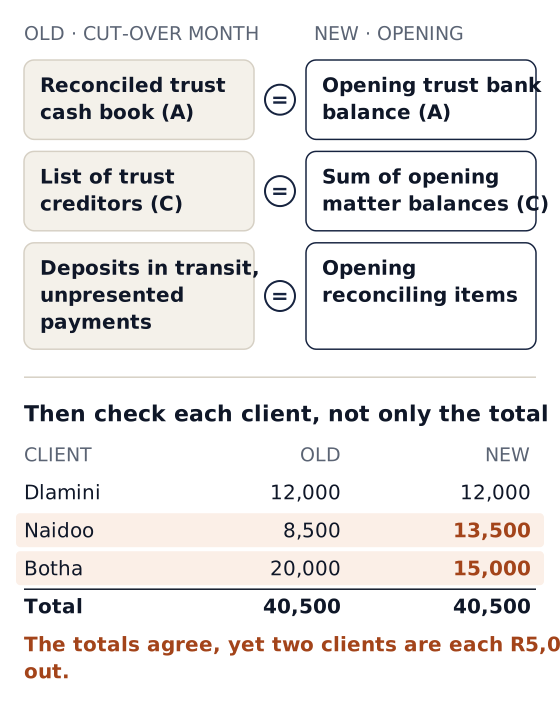
Old system, cut-over month:
  Reconciled trust cash book balance            R A
  + trust investments (s86(3))                  R B
  = Total trust funds                           R A + B
  Total of list of trust creditors              R C   (must equal A + B)

New system, opening position:
  Sum of opening trust balances per matter      R C   (must equal old C)
  Opening trust bank balance                    R A   (must equal old A)
Then check at the level of individual clients, not only the total. Two errors of R5,000 in opposite directions produce a correct total and two wrong client balances. Sort both lists by client and compare line by line, or have the vendor produce a comparison report.
Carry the reconciling items across
If the cut-over month had deposits in transit or unpresented payments, the new system's first reconciliation needs them. Otherwise the first month in the new system will not reconcile, and the reason will be buried in the old one. Enter them as opening reconciling items.
Section 86(4) investments
List every client investment with its bank, account, capital, accrued interest and maturity date. If the new system tracks investments, load them. If it does not, keep a separate investment register (and still record the trust balance attributable to each investing client). Diarise every maturity date in the new system either way. Our section 86 guide covers the rules.
Sign-off
The principal (or a director) and the bookkeeper sign the opening balance proof. File it with the cut-over month's reconciliation. Send a copy to your auditor. The audit year that spans both systems will need it.
Decision 4: what happens to the old system
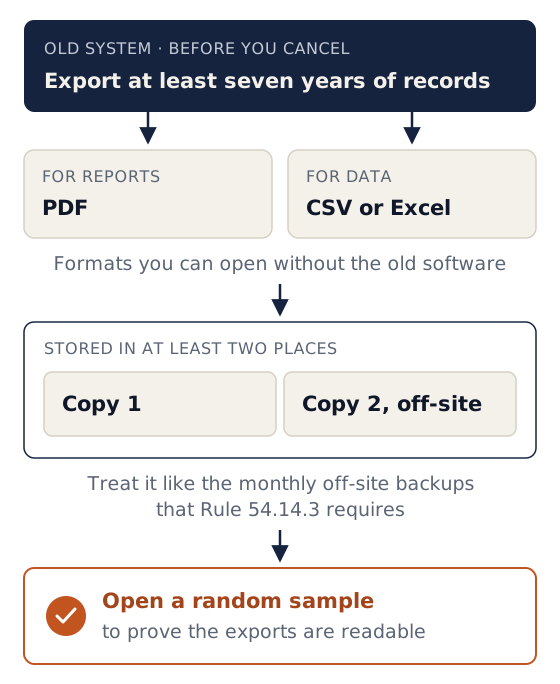
Before you cancel the old subscription or switch off the old server, export and check:
- Every monthly trust reconciliation and list of trust creditors for at least the last seven years (or since the firm started, if later).
- Trust and business ledgers per client, all years.
- Trial balances and financial statements for each year.
- Statements of account issued to clients.
- Client and matter lists, including closed matters.
- Documents, if the old system stored them.
Save them in formats you can open without the old software (PDF for reports, CSV or Excel for data), in at least two places, one of them off-site (Rule 54.14.3 requires monthly off-site backups of computerised records; treat your archive the same way). Open a random sample of the exports to prove they are readable.
If the old system keeps a read-only mode after cancellation, find out for how long and at what cost. Do not rely on it for seven years.
Before you sign with the new vendor, ask the same exit question: "If we leave you, what do we get, in what format, and how quickly?" A vendor who cannot answer clearly today will not make it easier later.
Week-by-week plan
A typical plan for a firm of 3 to 15 people, cutting over at the end of the month.
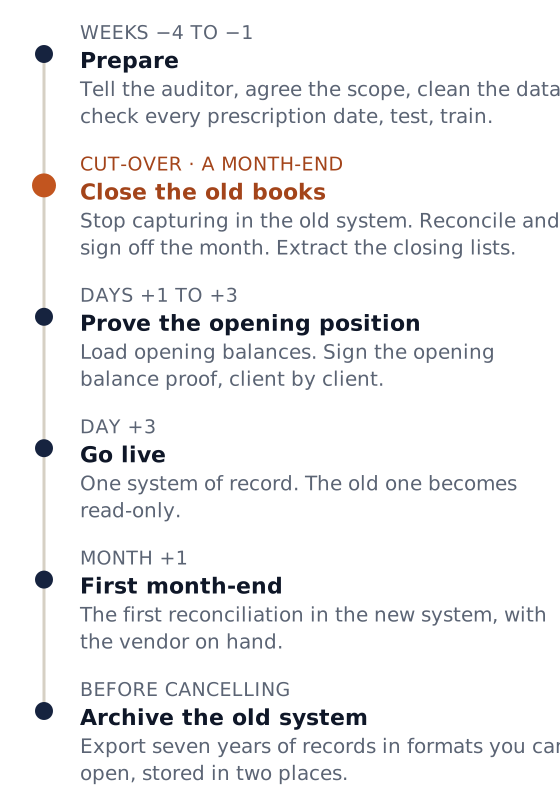
| When | What | Who |
|---|---|---|
| Week −4 | Choose the cut-over month-end. Tell the auditor. Agree with the vendor exactly what will be migrated. | Principal |
| Week −4 | Export clients, open matters and closed matters from the old system; send a sample to the vendor to test | Bookkeeper, vendor |
| Week −3 | Clean the data: merge duplicate clients, close matters that are finished, allocate unallocated trust money, fix debit balances | Bookkeeper, attorneys |
| Week −3 | Every attorney checks their own matters' prescription and court dates against the file | Attorneys |
| Week −2 | Vendor loads a test copy; attorneys spot-check 20 of their own matters | Vendor, attorneys |
| Week −2 | Configure the new system: letterhead, bank accounts, reference sequence, matter types, users and roles | Principal, vendor |
| Week −1 | Staff training on the test copy, using real matters | All staff |
| Cut-over day | Stop capturing in the old system. Reconcile and sign off the month. Extract closing lists. | Bookkeeper |
| Day +1 to +3 | Load opening balances. Complete and sign the opening balance proof. | Vendor, bookkeeper, principal |
| Day +3 | Go live. The old system becomes read-only. | Everyone |
| Week +2 | Check-in: what is confusing, what is missing | Principal, vendor |
| Month +1 | First month-end reconciliation in the new system, with the vendor on hand | Bookkeeper, vendor |
| Before cancelling old | Complete the Decision 4 export checklist | Bookkeeper |
Should you run both systems in parallel?
Not for trust. Capturing every trust transaction twice for a month doubles the work and creates two versions of the truth. Pick one system of record from the go-live date. If you want a safety net, keep the old system read-only for reference, and compare the first reconciliation in the new system against the opening proof.
Trust captured in both systems
- Every trust transaction captured twice for a month
- Double the work
- Two versions of the truth
One system of record
- Trust lives in the new system only
- The old system stays read-only, for reference
- First reconciliation compared against the opening proof
Migrating from paper or spreadsheets
If the old "system" is a diary book, a ledger card per client and a spreadsheet, the steps are the same, but data capture replaces export:
- Start with open matters only. A firm with 300 open matters can capture them in days; ten years of closed files can wait.
- Rebuild the trust balance per client from your latest reconciled position. If you have never produced a monthly list of trust creditors, produce one now, before cut-over. It may reveal differences you need to fix with your auditor first.
- Capture prescription dates as their own task, checked by the attorney on each matter.
A migration checklist
- Auditor told about the cut-over date.
- Scope agreed in writing with the vendor: what moves, who does it, cost, timeline.
- Data cleaned: duplicates merged, unallocated money allocated, debit balances fixed.
- Prescription and court dates checked by each attorney.
- Cut-over month reconciled and signed off in the old system.
- Opening trust balances match the list of trust creditors per client, not only in total.
- Reconciling items carried into the new system.
- Section 86(4) investments listed, with maturity dates diarised.
- Opening balance proof signed and sent to the auditor.
- Old records exported, readable, and stored in two places.
- Staff trained on real matters.
- First month-end in the new system done with vendor support.
How Caseo handles migration
With Caseo, migration is our job and is included at no charge: we move your clients, open matters and balances across from your current system or spreadsheets, and check the figures with you before you go live. Old files can keep their original reference numbers or use a reserved range, and new matters continue your numbering. When we moved Mathibe Thabang Attorneys off a manual system, we migrated more than 500 matters.
Leaving is straightforward too: administrators can export matters, clients, transactions and diary as CSV from Settings at any time, and documents are exported on request. Read more about migration to Caseo, compare options in our software buyer's guide, or have us call you to talk through your cut-over.