
There is no single best practice management system for every South African firm. A three-attorney RAF practice, a conveyancing firm and a 40-person commercial firm need different things. What is the same for all of them is the question underneath: will this system keep our trust account right, make month-end fast, stop us missing a date, and cost what we expect when we hire?
This guide sets out how to answer that, with the questions to ask in a demo and an overview of the main products sold in South Africa.
Disclosure: we make Caseo, one of the products listed. To keep this fair, every other product is described only from what its vendor publishes about itself (links provided, checked on 28 September 2026). We have not rated competitors, and we say where Caseo is not the right fit.
What practice management software covers in South Africa
In most markets "practice management" means matters, time and billing. In South Africa it has to include trust accounting, because every firm holding client money must keep records to the standard of LPC Rule 54. A complete system covers six jobs:
- Matters and clients. One record per client (ideally matched on ID number so the same person does not appear twice), with every matter, note, document and status change.
- Diary. Court dates, follow-ups and prescription dates, assigned to a person, with warnings.
- Trust and business accounting. Separate ledgers, per-matter trust balances, fee transfers, statements of account.
- Reconciliation and month-end. Bank statement to cash book to the list of trust creditors, reviewed and locked.
- Billing. Fees, disbursements, invoices, VAT where registered.
- Reporting and client communication. What is outstanding, who is carrying what, and a way for clients to check their matter without phoning.
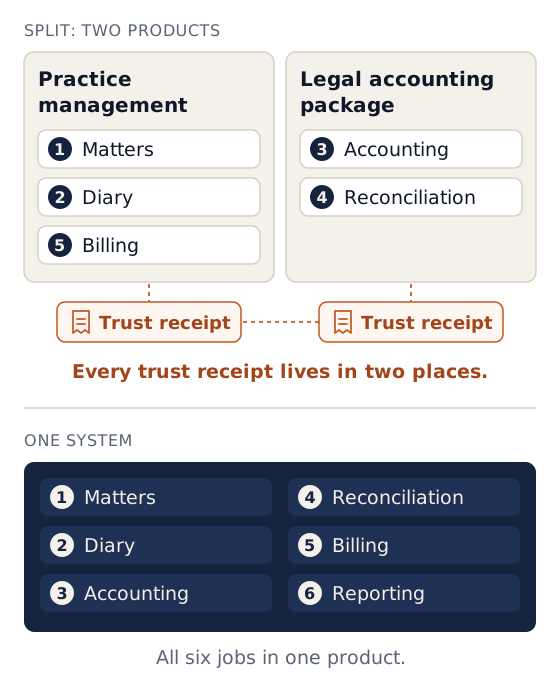
Some firms run jobs 1, 2 and 5 in one product and jobs 3 and 4 in a separate legal accounting package. That works, but every trust receipt then lives in two places. Most firms moving system today want one.
The eight criteria that matter
1. Does it enforce the trust rules, or just record them?
Every product that sells to South African attorneys says it handles trust accounting. The difference is whether it stops the common breaches or lets you capture them and find out at audit. In a demo, ask the vendor to try each of these and show you what happens:
- Pay out more from trust for a client than you hold for them (Rule 54.14.9: no trust creditor may be in debit).
- Back-date a payment so a client was in debit two weeks ago, even though they are in credit today.
- Transfer more from trust to business than the fees and disbursements debited to that client (Rules 54.11.2 and 54.14.14).
- Delete a trust entry. (It should only be reversible, with a reason.)
- Change an entry in a month that has already been reconciled.
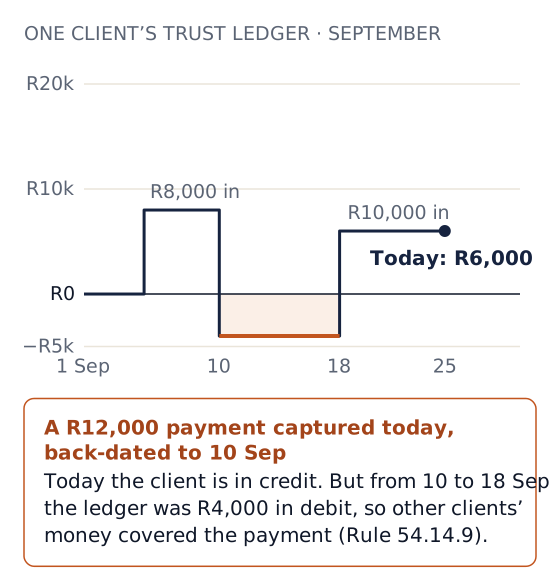
A system that allows all five is a ledger. A system that refuses them is a control, which is what Rule 54.14.12 asks for.
2. How long does month-end take?
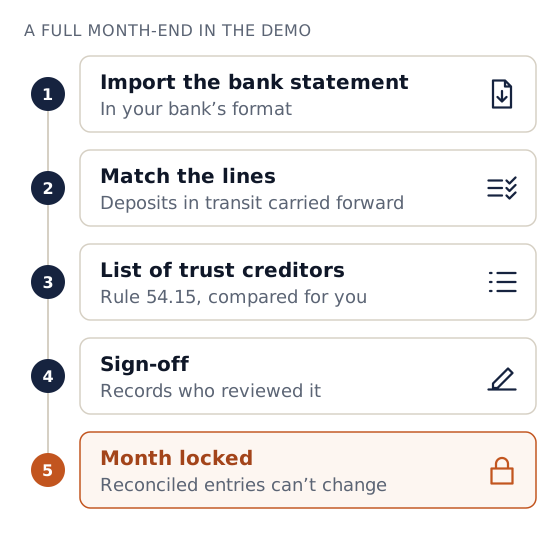
Ask to see a full trust reconciliation from importing a bank statement to sign-off. Which statement formats does it accept from your bank? Does it match lines automatically? Does it carry deposits in transit forward? Does it produce the Rule 54.15 list of trust creditors and compare it for you? Does sign-off record who reviewed it, and lock the month?
3. Statements of account
Rule 54.12 requires a written account to the client at the end of a mandate. Ask to see one produced, and ask whether an issued statement is kept exactly as issued or regenerated from current data (which may have changed since).
The statement the client received
The copy on file is the one issued at the end of the mandate, unchanged.
Rebuilt from current data
Produced again from today’s records, which may have changed since the statement was issued.
4. Diary and prescription
Ask how a prescription date is captured, who is reminded, how many times, and what happens to an attorney's diary when they leave. Prescribed claims, RAF claims above all, are the most common cause of claims notified to the Legal Practitioners Indemnity Insurance Fund (De Rebus).
5. Price, now and when you grow
Most published prices are per user. LawPracticeZA says it charges only for qualified and candidate attorneys, with other staff free. Caseo charges one flat fee. Work out the cost for everyone who will need a login in 12 months (attorneys, candidates, secretaries, bookkeeper, auditor), not only today's attorneys. See the pricing section below.
6. Migration, and your exit
Ask what the vendor migrates (clients, open matters, trust balances per matter, history?), who does the work, what it costs and how long it takes.
Then ask the opposite: how do you get all your data out if you leave? Rule 54.14.4.2 requires electronic records to remain retrievable in readable form, "including by converting the records from legacy to later systems". See our guide to switching software.
…including by converting the records from legacy to later systems
LPC Rules, Rule 54.14.4.2In practice: your records have to stay retrievable in readable form after a system change, so ask how data comes in and how all of it comes out before you sign.
7. Security and privacy
Ask for:
- Individual logins. Never shared.
- Two-step verification.
- Role-based access. A receptionist should not see trust balances.
- An audit trail. Who changed what.
- Bank-detail alerts. An alert when anyone changes the firm's bank details.
Under POPIA your firm is the responsible party and the vendor is an operator, so ask for their written operator agreement and where your data is processed and stored.
8. Who answers the phone
At month-end, a support ticket answered in three days is a missed deadline. Ask who you will actually speak to, and ask for a reference firm of your size.
Demo scorecard
Print this and take it to every demo.
| # | Question | Vendor A | Vendor B | Vendor C |
|---|---|---|---|---|
| 1 | Refuses a trust payment that puts a client in debit (including back-dated)? | |||
| 2 | Refuses a fee transfer larger than fees debited to that client? | |||
| 3 | Trust entries reversal-only, with reason? | |||
| 4 | Imports my bank's statement format for reconciliation? | |||
| 5 | Produces the list of trust creditors and compares it automatically? | |||
| 6 | Month sign-off with reviewer name and a lock? | |||
| 7 | Rule 54.12 statement of account, kept as issued? | |||
| 8 | Prescription dates with multiple reminders, assigned to a person? | |||
| 9 | Works on a phone at court? | |||
| 10 | Total monthly cost for everyone needing a login in 12 months | |||
| 11 | What migration includes, cost and timeline | |||
| 12 | Full data export on exit (format, what's included) |
The main options in South Africa
Listed alphabetically. Descriptions come from each vendor's own website unless stated.
| Product | What the vendor says | Deployment | Published price |
|---|---|---|---|
| AJS | Practice management and trust accounting, "Trusted Since '79"; also document automation (XpressDox) and a legal costs calculator (Firefly). "No Fixed Contracts", with month-to-month payment (software page). | Browser-based | Not published |
| Caseo | Practice management built around LPC Rule 54: matters, diary, trust and business accounting, reconciliation with month-end sign-off, invoicing, reports, client portal, phone app. | Cloud (browser and phone) | R1,000/month for the whole firm, unlimited users |
| CaseFox | International practice management with a South African page, rand pricing and a free plan; says it is trusted by 25,000+ law firms worldwide. | Cloud | Per user: Pro R837/user/month billed monthly (R725 billed yearly); Enterprise R1,842 (R1,469 billed yearly) |
| Clio | International practice management; legal accounting, including trust reconciliation, on every plan. A February 2025 De Rebus advertorial paid for by Clio says the LSSA recommends Clio and that practitioners can choose any other provider. | Cloud | From US$49 per user/month |
| GhostPractice | Billing, trust accounting, matter and document management; built for firms of 5 to 300 people. Implementation and data conversion free; you pay from go-live (FAQ). Acquired by Dye & Durham in 2023. | Cloud, on-premise or third-party hosted, per the FAQ | Monthly rental calculated per firm configuration |
| LawBox | Cloud practice management and trust accounting aimed at start-ups and small firms; 14-day free trial. | Cloud | R650/month billed monthly (R550 billed annually) for 1 user plus read-only accountant access; R150 per extra user; R150 registration |
| LawPracticeZA | Billing, matter management, business and trust accounting, LPC 86(4) investment accounting, payroll; SA, Botswana and Namibia. Charges only for qualified and candidate attorneys; other staff free; 30 days' notice. | Cloud | Not published |
| Legal Interact | Practice Manager Pro: matter and document management, billing and integrated accounting for medium to large, multi-branch firms. | Cloud-hosted or on-premise | Not published |
| LegalSuite | Practice management and legal accounting for SA and Namibia, with add-on modules such as conveyancing and litigation; established 1987, says it has over 9,000 users. | Desktop, with partner cloud hosting, plus browser and mobile versions | Not published |
| Lexpro | Accounting for SA attorneys, including trust, section 86 investments and VAT, plus conveyancing, litigation and deceased estates modules. Month by month, no long-term contracts. | Cloud | Not published |
Prices and features as published by each vendor on 28 September 2026; check their sites for current terms.
Also common: a general accounting package (Sage/Pastel or Xero) for the business books plus a spreadsheet for trust. We explain the trade-offs in attorney accounting software: what trust accounting needs.
What it costs
Only a few vendors publish prices, so a full comparison is not possible from public information. The useful exercise is to price your firm. Take everyone who will need a login in 12 months and ask each vendor for the all-in monthly figure, including VAT, support, migration and any "modules".
A worked example using only published prices, for a firm of three attorneys and three support staff (six logins):
| Monthly cost | Basis | |
|---|---|---|
| LawBox (month-to-month plan) | R1,400 | R650 for the first user + 5 × R150 (LawBox's page does not say whether VAT is included) |
| Caseo | R1,000 | Flat, whole firm |
| Per-user product at R700/user (illustrative) | R4,200 | 6 × R700 |
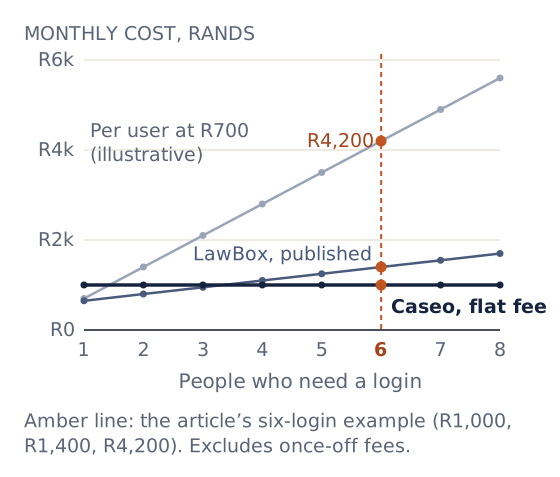
For a sole practitioner working alone, a per-user product is often cheaper than a flat fee: LawBox's published one-user price is lower than Caseo's. The flat fee pulls ahead as the firm grows, and it does not change when you hire a candidate attorney or a second secretary.
Where Caseo fits, and where it does not
Caseo is a strong fit for:
- Firms of roughly 2 to 20 people doing litigation, RAF, criminal, family and general work, where trust money moves every week and the diary is the firm's memory.
- Firms currently on paper, spreadsheets or a general accounting package who want trust rules enforced rather than checked afterwards. Our reference customer, Mathibe Thabang Attorneys, moved off a manual system and we migrated more than 500 matters.
- Principals who want to see the practice from a phone: the next court date, a matter's notes and diary, and (for supervisors) the trust position.
What Caseo does on trust:
- Debits
- Refuses any trust payment, transfer or reversal that would leave a matter in debit on any day from its date onward, so back-dating is caught.
- Fee transfers
- Refuses fee transfers above what the matter owes.
- Corrections
- Trust entries are reversal-only.
- Month-end
- Locks a month once the reconciliation has a zero difference and has been signed off.
- Statements
- Statements of account are numbered per matter and archived exactly as issued.
Caseo is not the right fit (today) if:
- You hold many section 86(4) investments. Caseo does not have an investment-account module; products such as LawPracticeZA and Lexpro advertise one.
- Your practice is mainly conveyancing and you need integration with conveyancing systems. Caseo does not integrate with them.
- You are a sole practitioner choosing mainly on price. See the pricing section above.
- You want the vendor to do your bookkeeping for you. Caseo is software; your bookkeeper works in it.
Frequently asked questions
Does the Legal Practice Council endorse any software? No. The LPC does not approve or certify software. Compliance with Rule 54 is the firm's responsibility; software can make it easier, and your auditor tests the result.
Should the software or my auditor decide the trust setup? Your auditor. Show them the demo scorecard answers and ask whether the system's controls would satisfy their testing.
Can I switch mid-year? Yes, but cut over at a month-end you have reconciled and signed off, so the opening trust balances in the new system match a known, reviewed position. Our switching guide covers the steps.
Cloud or on-premise? Most of the products listed above offer a cloud option. Whichever you choose, Rule 54.9.2.1 requires offsite electronic records to be reasonably secured and immediately accessible to the firm and the Council, and Rule 54.14.3 requires monthly backups kept remote from the firm.
See it on your own files
If you are comparing systems, run Caseo through the scorecard above, then have us call you. Tell us what you use now and we will call within one business day, show you what happens when someone tries to put a client in debit, and if Caseo is not the right fit for your firm, say so.