
A law firm keeps two sets of books that behave very differently. The business books record the firm's own money: fees earned, rent, salaries, VAT. Any competent accounting package can do that. The trust books record money the firm holds for other people, often hundreds of them at once, and every rand has to be attributable to a named person at all times. That second job is what makes attorney accounting software a category of its own.
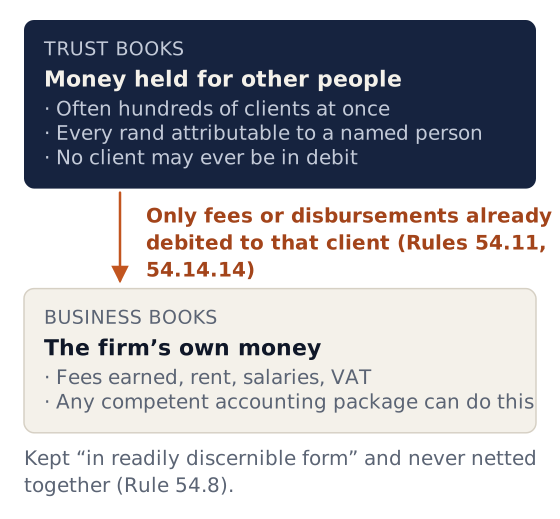
This guide explains what the trust side actually requires, why general packages struggle with it, and what to check before you buy.
General information, not accounting, tax or legal advice.
What trust accounting has to do that normal accounting does not
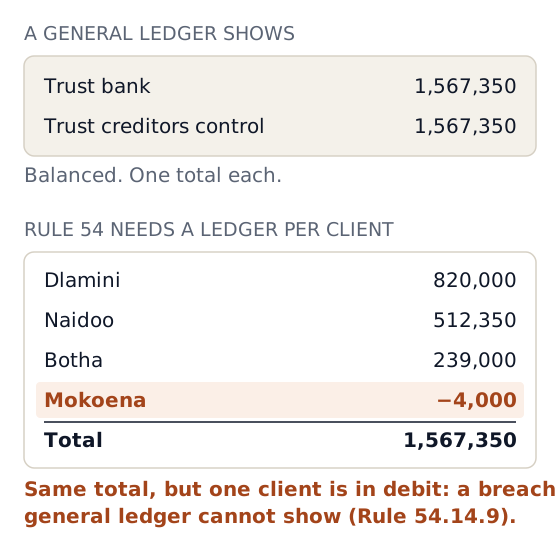
In a general ledger, "trust bank" is one asset account and "trust creditors" is one liability account. Both show a single total. LPC Rule 54 needs much more than the total:
| Requirement | Rule | What the software must do |
|---|---|---|
| Know what is held for each person, by name | 54.6.3.1, 54.15.1 | A trust ledger per client (or per matter) that is the source of the trust creditors total, not a spreadsheet beside it |
| Keep trust and business "readily discernible" | 54.8 | Separate ledgers, separate bank accounts, no netting of trust against business |
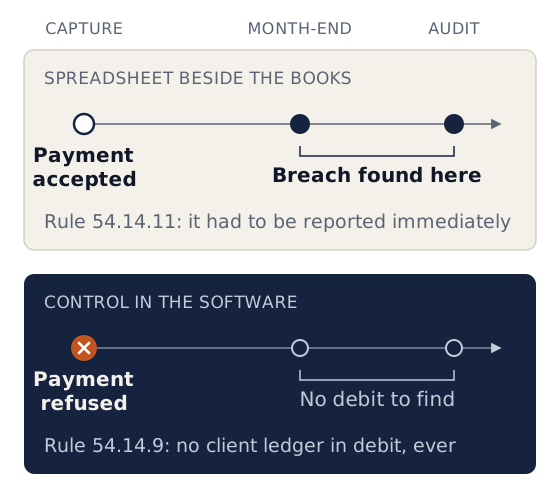
| No client ledger in debit, ever | 54.14.9 | Refuse (or at least block) a payment that would overdraw a client, including a back-dated one |
| Trust funds never less than trust creditors | 54.14.8 | A reconciliation that proves it monthly |
| Transfers to business only for money due, identifiable per client | 54.11.2, 54.14.14 | A fee or disbursement debited to the client first; transfer capped at that amount |
| A system that prevents transfer breaches | 54.14.12 | Controls in the software, not only a policy |
| Monthly list of trust creditors, compared to trust funds | 54.15 | Generated from the ledger, retained with the records |
| Written account to the client at the end of a mandate | 54.12 | A statement of account showing receipts, payments, fees (flagging agreed fees) and the balance |
| Verified payee details and an audit trail for electronic payments | 54.13, 54.14.5 | A record of who captured, who approved and what was paid to whom |
| Section 86(4) investments and their interest | 54.6.3.2, 54.17 | Investment records per client (if your firm uses them; see our section 86 guide) |
| Records kept seven years, retrievable in readable form | 54.9.1, 54.14.4.2 | Reliable export, even after you stop paying the vendor |
Can a firm use Sage, Pastel or Xero for trust?
For the business books, yes, and many firms do. For the trust books, a general package can hold the trust bank account and a trust creditors control account, but the rules in the table above are not what it was designed for. The usual pattern at small firms is a general package for business plus a spreadsheet (or ledger cards) for the per-client trust balances. That creates three weaknesses:
- Two sources of truth.The trust bank balance is in the accounting package; the per-client balances are in the spreadsheet. Every month, someone has to prove they agree, and every edit to the spreadsheet can break that.
- No preventive controls.A spreadsheet will happily let a client's balance go negative, and it cannot stop a transfer to business that exceeds the fees debited. You find the breach at month-end or at audit, when Rule 54.14.11 required you to report it immediately. Rule 54.14.11
- Weak audit trail.It is hard to show that a list of trust creditors was extracted from a ledger rather than typed, or that a reconciled month was not changed afterwards.
Some general packages offer legal add-ons or third-party integrations. If you go that route, test the add-on against the table above, especially the debit and transfer controls.
A general package remains useful for what it does best. Many firms keep their external accountant on it for the annual financial statements and tax, while the day-to-day trust and matter accounting runs in a legal system.
The business side: what legal software should also handle
Fees, disbursements and VAT
If the firm is a VAT vendor, VAT is charged on fees. Disbursements the firm pays as agent for the client (for example, sheriff's fees or court fees paid on the client's behalf) are generally recovered without adding VAT, while costs the firm incurs as principal and recharges are subject to VAT (Tax Faculty on VAT and disbursements). Your system needs to treat the two differently and show them separately on the invoice. Confirm your firm's treatment with your tax practitioner.
The firm's own fees
+ VAT
- VAT is charged on fees if the firm is a VAT vendor
Disbursements paid on the client's behalf
No VAT added
- For example, sheriff's fees or court fees
- Generally recovered without adding VAT
Costs the firm incurs and recharges
+ VAT
- Subject to VAT when recharged
A tax invoice has content requirements under section 20 of the VAT Act, including the recipient's details for invoices above R5,000. Good software refuses to issue a "Tax Invoice" when the firm has no VAT number on record, and asks for the client's address when the invoice needs it.
Contingency fees
Under section 2(2) of the Contingency Fees Act 66 of 1997, a success fee may not exceed the normal fee by more than 100%, and in claims sounding in money the total success fee may not exceed 25% of the amount awarded or obtained, excluding costs. RAF and personal injury firms benefit from software that records the agreement on the matter and caps the fee.
Statements, receipts and invoices that cannot be quietly changed
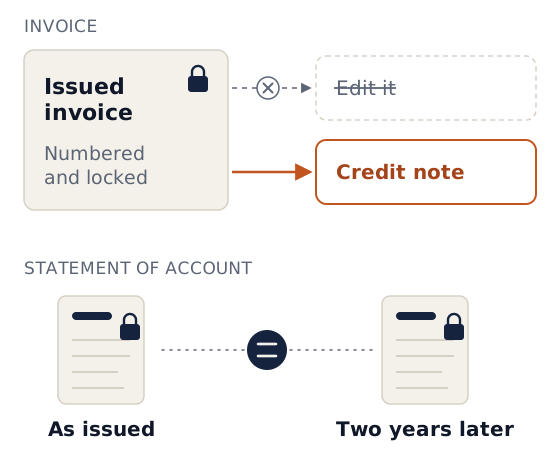
Issued documents should be numbered and locked. An invoice is corrected by a credit note, not by editing it. A statement of account should be kept exactly as issued, so that the copy you produce two years later is the one the client received.
Money reports a principal actually uses
- Outstanding fees and disbursements per matter, aged, with how much trust already held could cover.
- Trust-to-business transfers for the month, per client.
- Unpaid invoices.
- Business income and expenses.
- Collections from third-party payers (Legal Aid, insurers, medical schemes).
Integrated or separate?
| Model | How it works | Suits |
|---|---|---|
| Separate legal accounting package + separate practice management | The bookkeeper works in the accounting system; attorneys work in the matter system | Larger firms with a dedicated accounts department and established processes |
| Integrated practice management with trust and business accounting | Matters, diary and money in one system; the attorney and bookkeeper see the same matter | Small and mid-size firms where the principal wants one place to look |
| General package + spreadsheet | Business in Sage/Pastel/Xero; trust per client in Excel | Very small firms, often as a stop-gap; the weaknesses above apply |
The main practical advantage of integration is that trust money is never "somewhere else". When an attorney opens a matter, they see the client's trust balance before promising anyone a payment.
Buyer's checklist
Ask each vendor to demonstrate, not describe:
- A trust payment that would put a client in debit is refused, including a back-dated one.
- A fee transfer larger than the fees and disbursements debited to that client is refused.
- Trust entries can be reversed with a reason, but not deleted.
- A trust deposit can be held as "unallocated" and allocated later, visibly, without editing a closed month.
- Bank statement import in your bank's format, with matching.
- A three-way check: bank, cash book and trust creditors.
- Month sign-off with the reviewer's name, and a lock on the month.
- Rule 54.12 statement of account, archived as issued.
- Separate receipt number series for trust and business.
- VAT on fees only, correct tax invoice rules, credit notes.
- Contingency fee cap, if you do contingency work.
- Role-based access: who can see money, who can pay from trust, who can change bank details.
- An alert to the principal when anyone changes the firm's bank details.
- Export of all accounting records in a readable format.
- Access for your auditor or bookkeeper.
Where Caseo fits
Caseo is integrated practice management built around LPC Rule 54. Trust and business are separate ledgers against every matter and are never netted together. On trust, the server refuses:
- A debit on any day. Any payment, transfer, reversal or allocation that would leave a matter in debit on any day from its date onward.
- An oversized fee transfer. Fee transfers above what the matter owes or holds.
- Deleting a trust entry. Trust entries are reversal-only.
Trust and business receipts have separate number series. Invoices charge VAT on fees only, are locked once issued and are corrected by credit note. Statements of account are issued separately for trust and business, numbered per matter and archived exactly as issued. Contingency fee agreements are recorded on the matter with fees capped at 25%.
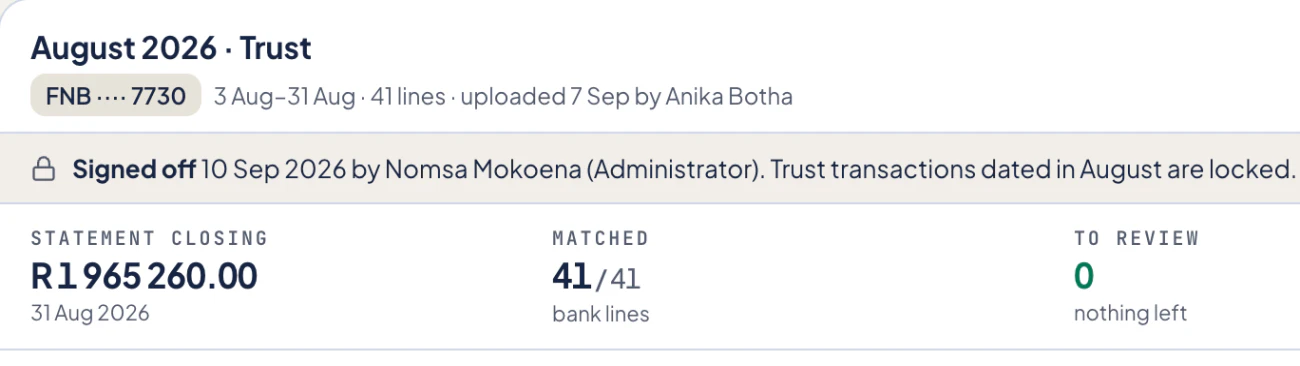
The monthly reconciliation imports your bank statement, runs a three-way check labelled with Rule 54 references and locks the month on sign-off.
 1
2
3
1
2
3
- The month's bank statement is imported, with who uploaded it and when.
- Sign-off records who signed and when, and locks that month's trust transactions.
- Bank lines are matched to the books; sign-off waits until nothing is left to review.
What Caseo does not do: it has no section 86 investment module, no live bank feed (statements are imported), and it records salaries as paid rather than running payroll. Your accountant keeps doing your annual financial statements and tax.
To compare it with other systems, see our guide to legal practice management software in South Africa. To see the trust controls for yourself, have us call you and we will walk you through them. It is R1,000 a month for the whole firm, with unlimited users.